Troubleshooting
Planet Zoo 2 Not Working? How to Fix It
Planet Zoo 2 not launching, crashing or stuck on Franchise? Tick through Frontier's own fixes, starting with the issues it is already fixing.
Last updated Game version: Update 1.0.10 (November 9, 2026)
Planet Zoo 2 fix checklist
17 checks from Frontier's Customer Support articles, quickest first.
0 of 17 steps ticked. Your ticks stay in this browser.
Planet Zoo 2 not launching on PC
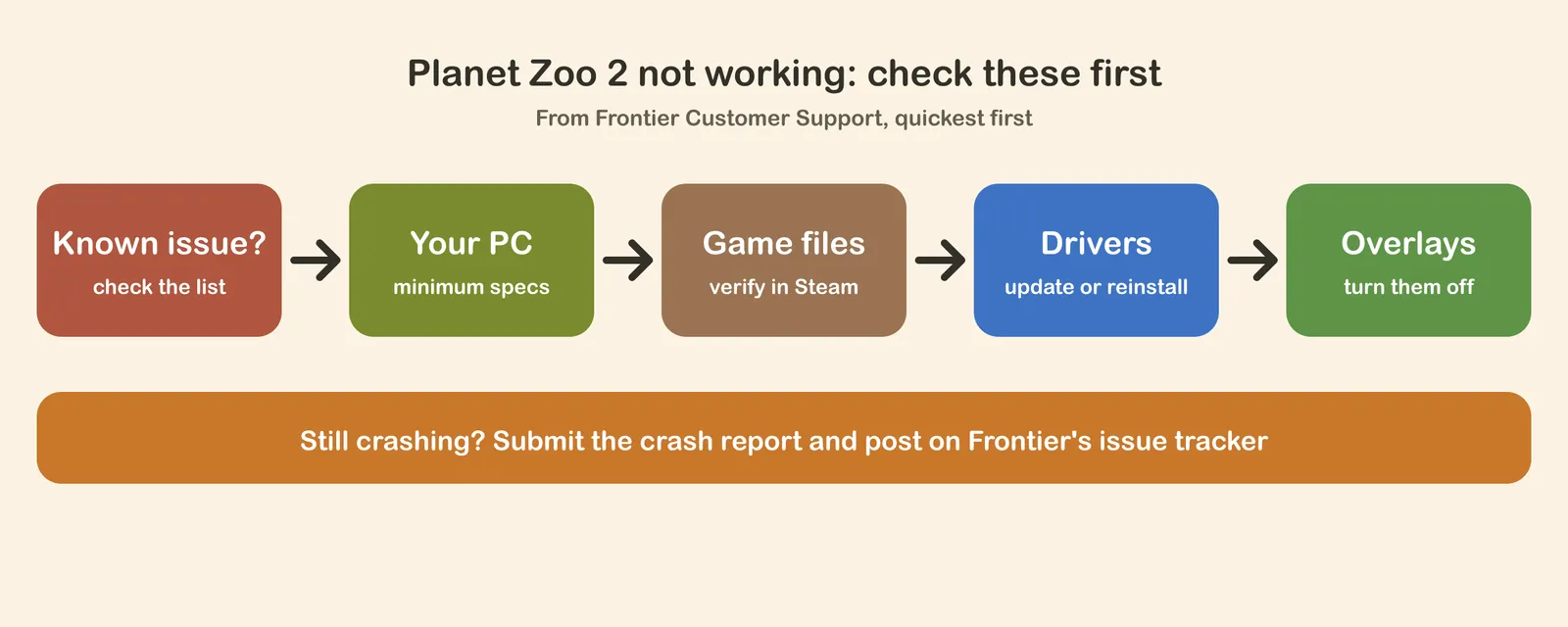
If you click Play and nothing happens, or the game closes before the menu, go through the PC part of the checklist in order. The game needs 64-bit Windows 10 or 11 and DirectX 12, so compare your machine on our Planet Zoo 2 system requirements page first. Then let Steam check the game files: verifying replaces any file that is missing or damaged without touching your saves.
Graphics drivers are the next suspect. Frontier notes that a brand-new NVIDIA or AMD driver sometimes brings problems the older one did not have, so if trouble started right after a driver update, a clean install of the last driver that worked is worth trying. Overlays and recording tools come after that: the Steam, Discord and GeForce Experience overlays, the Xbox Game Bar, and programs such as OBS or MSI Afterburner all hook into the game and can make it crash.
Planet Zoo 2 keeps crashing
Some crashes are bugs that only an update can fix. Update 1.0.6 on 23 October 2026 fixed 5 sets of crashes and graphics problems, among them a crash when multi-selecting grid pieces and one when releasing animals into a Franchise Wildlife Reserve. Update 1.0.8 on 29 October 2026 fixed two crashes while loading a zoo, so a save that would not open is worth trying again, plus a crash when moving a connected water filter and various others. Update 1.0.9 on 5 November 2026 fixed a crash linked to Loony Bloons and Souvenir shops that could also make a zoo crash while loading. Update the game and load that zoo again: Frontier says the saves are intact. Update 1.0.10 on 9 November 2026 fixed another crash that stopped some zoos loading, a rare crash in the Scotland reserve Career scenario and a crash when you cancelled loading into Career and then chose Franchise. If a save is still blocked, Frontier asks you to report it on the issue tracker with a copy of the save.
When the game offers to send a crash report, choose Submit: Frontier uses those reports to find the cause. If the crash keeps coming back, report it on the Frontier issue tracker with what you were doing, whether it happened before and a DxDiag file. Frontier's support team helps with getting back into the game and with in-game losses a bug caused, but bugs themselves go on the tracker.
Planet Zoo 2 not working on PS5 or Xbox
On consoles Frontier's first step is to clear the console's cache by cutting its power completely, as the checklist above describes; this helps with both crashes and connection trouble. If crashes continue, delete the game and install it again, use a wired connection instead of Wi-Fi, and make sure the console has space around it to stay cool.
Franchise mode not working
Franchise mode is the online part of the game, so connection problems show up there first, while Career and Sandbox keep working offline. Frontier says that playing through a VPN, particularly in Franchise mode, can cause connection problems. Hotfix 1.0.7 fixed Resume on a Franchise save showing a connection error and then blocking every game mode, and Frontier says no saves were lost. Players reporting that they cannot connect to Franchise after Update 1.0.6 is one of the top issues on the official issue tracker. How Franchise works is on our Planet Zoo 2 Franchise mode guide.
Zoopedia not showing animals
A Zoopedia that is empty or shows only the Aardvark is a known bug. Zoopedia not showing animals is on Frontier's issue tracker, reported on all platforms since Update 1.0.4, and the official Help page lists it among the top issues. Until it is fixed, our Planet Zoo 2 animal list has every animal's official Zoopedia facts, and the Planet Zoo 2 Zoopedia guide explains each part of an entry. The four ways players get the list back are on our Planet Zoo 2 Zoopedia not working page.
“Failure to save” error
On PC this message means the game cannot find the Windows Saved Games folder, where it keeps your saves. Type shell:SavedGames into File Explorer's address bar: if nothing opens, the folder is gone, and Frontier's Save/Load Error article has a file that puts it back. Our Planet Zoo 2 bugs and known issues page also has tips to keep your saves safe.
Steam Deck
Update 1.0.5 fixed the Steam Deck failing to connect to the server with Proton 11 or newer. If the Workshop still will not connect on the latest Proton, Frontier's Steam Deck support article shows which compatibility setting to choose under Manage, Properties.
Windows 10
Windows 10 is still in the minimum specs, but Frontier notes that Microsoft has ended support for it, so it cannot promise the game will keep working there. If you are on Windows 10 and nothing else on this page helps, Windows 11 is the recommended system.
Also seen in the game
- Reloading the save can bring an empty Zoopedia back.
Planet Zoo 2 not working questions
Why is Planet Zoo 2 not working?
First check whether it is a known issue: Frontier lists the problems it is fixing, and several crashes were fixed in Updates 1.0.6, 1.0.8, 1.0.9 and 1.0.10. If yours is not on the list, the usual causes on PC are a PC below the minimum specs, damaged game files, an old or faulty graphics driver, and overlays or recording programs running alongside the game.
Why will Planet Zoo 2 not launch on PC?
Check that your PC has 64-bit Windows 10 or 11 with DirectX 12, verify the game files in Steam, update or clean-install your graphics driver, install Windows updates, and turn off the Steam, Discord, GeForce Experience and Xbox Game Bar overlays. Those are the first steps in Frontier’s own support article.
Are the Planet Zoo 2 servers down?
Only the online parts need Frontier’s servers: Franchise mode and the Workshop. Career and Sandbox play offline once the game is downloaded. If Franchise will not connect, turn off any VPN, which Frontier says can cause connection problems, and look for your problem on the official issue tracker.
Why is the Zoopedia empty in Planet Zoo 2?
It is a known bug: Zoopedia not showing animals is on Frontier’s issue tracker, reported on all platforms since Update 1.0.4, and the official Help page lists it among the top issues. Until it is fixed, every animal’s official facts are on our Planet Zoo 2 animal list.
Does Planet Zoo 2 work on Windows 10?
Windows 10 is in the minimum specs, but Frontier notes that Microsoft has ended support for it, so it cannot promise the game will keep working there. Windows 11 is the recommended system.
Sources
- Launch, crashing or performance issues with Planet Zoo 2 on PC (Frontier Customer Support)
- Launch, crashing or performance issues with Planet Zoo 2 on Console (Frontier Customer Support)
- Save/Load Error in Planet Zoo 2 (Frontier Customer Support)
- Workshop Issues with SteamOS/Steam Deck (Frontier Customer Support)
- Reporting a bug (Frontier Customer Support)
- Planet Zoo 2 Help, with the top issues on the tracker (official)
- Planet Zoo 2 Update 1.0.6, on crash fixes and VPN use (official patch notes, 23 October 2026)
- Planet Zoo 2 Hotfix 1.0.7 (official, 23 October 2026)
- Planet Zoo 2 Update 1.0.8, on crashes while loading a zoo (official patch notes, 29 October 2026)
- Planet Zoo 2 Update 1.0.10, on loading and Career crashes (official patch notes, 9 November 2026)
- Planet Zoo 2 Update 1.0.9, on the Loony Bloons and Souvenir shop crash (official patch notes, 5 November 2026)
- Frontier issue tracker for Planet Zoo 2 (official)
Checked against the official pages on November 5, 2026. The fixes are Frontier's, in our own words; the crash and Franchise fixes come from the official update notes, checked November 10, 2026. The point under Also seen in the game is not part of the checklist.
Continue reading
 Next stepStill broken? See every issue Frontier is fixing and what the next update brings.Planet Zoo 2 Bugs & Known IssuesEvery issue Frontier has named, by area of the game: fixes in testing for the next update, ongoing work, what is already fixed, and how to report a bug.Go there
Related pages
 TroubleshootingPlanet Zoo 2 Zoopedia Not Working or EmptyWhy the in-game Zoopedia goes blank or sticks on the Aardvark, four quick ways to bring the animals back, the Zoopedia fixes already out and how to add your report to Frontier’s entry.
 PC specsPlanet Zoo 2 System Requirements and PC CheckMinimum and recommended PC specs from Frontier, what matters most in big zoos, and a quick check of your own PC.
 FranchisePlanet Zoo 2 Franchise Mode Guide & TipsHow Franchise mode works, how to start one, what each accreditation tier needs, trading with players, and the animals you can buy by biome.